Tutorial: Corporate actions
In this tutorial we will look at how to edit transactions when shares you own are affected by a corporate action. The main types of corporate actions are:
| Share split | Where existing shares are divided into multiple shares |
| Share consolidation | A reverse split where the number of shares is reduced |
| Merger | The combining of two or more companies |
| Demerger | Selling off subsidiaries or divisions of a company |
Corporate actions can take the form of just one or a mixture of the above mentioned actions. These do not always affect the number or type of shares you hold in a company, but when they do you need to add or edit your transactions to record these correctly.
Share Splits and Consolidations
A share split may be performed, for example, if a company's share price has grown so high that too many investors the shares' are too expensive to buy in round lots. A consolidation, or reverse split, can be a bad sign - a company may do it to make their stock look more valuable when, in fact, nothing has changed. A company may also do a reverse split to avoid being delisted.
In most instances of splits and consolidations the overall market value of the company is not changed - the share price is adjusted by the same ratio used for the share split or consolidation. In ShareScope the share price is adjusted historically to reflect the split or consolidation, however your holding within your portfolios is not.
As a shareholder you should receive prior notification of any corporate action as these usually require a vote at an Annual or Extraordinary General Meeting.
Let's look at some examples of splits and consolidations and how you would record these in ShareScope.
Share Split
Domino's Pizza UK & IRL PLC - Share Split (3 for 1) 27 June 2016
Corporate action details:
Further to the Company's announcement on 23 June 2016, the Company (Domino's Pizza UK & IRL PLC) confirms that the sub-division of each of its ordinary shares of 1.5625 pence each into 3 new ordinary shares of 25/48ths of a penny each ("New Ordinary Shares") (the "Sub-division") has become effective and that the Official List of the UKLA has been amended to reflect the Sub-division.
How this affects your holding:
The number of shares you held as of 27/06/16 is, in effect, multiplied by 3. If you originally held 100 shares, you would now hold 300 shares. At the same time, the share price is decreased threefold - meaning the overall value of your holding remains the same.
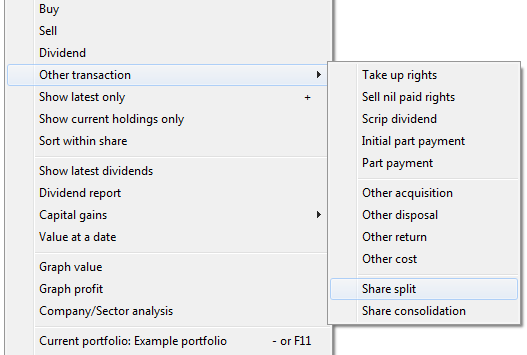
Right click on Domino's in the transactions view, choose Other transaction and select Share split.
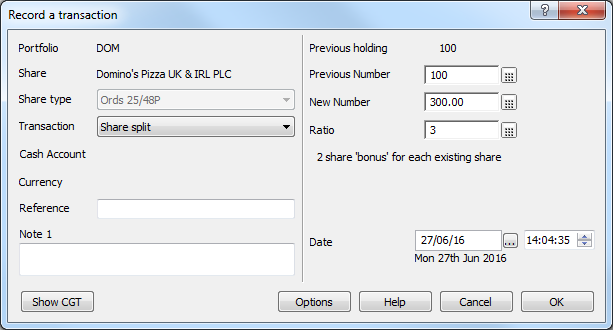
You can enter the ratio of the share split or (if you know) the new number of holdings. Make sure you enter the correct date.
Once you've recorded the split transaction, your records would look something like this:

Share Consolidation
Computacenter PLC - Share consolidation (15 for 17) 20/02/15
Corporate action details:
Reflecting the issue and allotment of the B Shares, 139,012,366 Existing Ordinary Shares will today be consolidated into the 122,657,970 New Ordinary Shares of 7 5/9 pence each. Application has been made to the Financial Conduct Authority and the London Stock Exchange and it is expected that the New Ordinary Shares will be admitted to the premium listing segment of the Official List of the Financial Conduct Authority and will commence trading on the London Stock Exchange's main market for regulated securities at 8.00 a.m. today.
If you do the math then:
122,657,970/139,012,366 = 15/17 = 0.88
How this affects your holding:
The number of shares you held as of 19/02/15 is, in effect, multiplied by 0.88. If you originally held 100 shares, you would now hold 88 shares. At the same time, the share price is increased by the same factor - therefore the value of your holding remains the same.
In ShareScope we reduce the price, however we do not adjust the size of your holding - this you need to do yourself. Let's say you had bought 1000 Computacenter shares at the beginning of 2013.
Your transactions may have looked something like those below, where the value based on a closing price of £5.425 on 25/02/08 is calculated as £542.50 due to the incorrect number of shares being used.

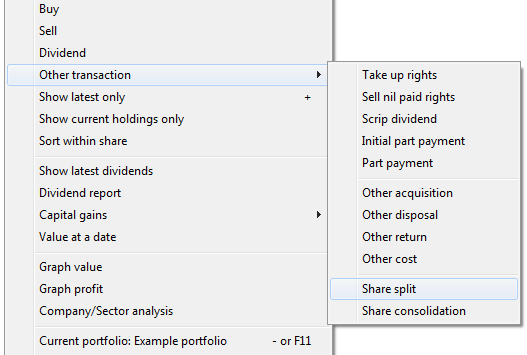
From the transaction screen, right click, go to Other transaction and select Share consolidation.
The following dialog will open.
Enter the new number of shares as a result of the consolidation, in this case 880, and ensure the correct date and time are selected.
Click on OK to save the transaction and your records should look more like this:
Note that the value based on the same closing price of £5.
Merger
TUI Travel merger on 17 December 2014
Corporate action details:
On 15 September 2014, the Independent Directors of TUI Travel PLC ("TUI Travel") and the Executive Board (Vorstand) of TUI AG announced that they had reached agreement on the terms of a recommended all-share nil-premium merger of TUI Travel and TUI AG (the "Merger"), to be implemented by way of a scheme of arrangement of TUI Travel under Part 26 of the Companies Act 2006 (the "Scheme"). The document in respect of the Scheme was published on 2 October 2014 (the "Scheme Document").
Applications have been made to the UK Listing Authority and the London Stock Exchange for the TUI AG Shares to be admitted to listing and trading on the Main Market of the London Stock Exchange with effect from 8:00 a.m. on 17 December 2014.
How this affects your holding:
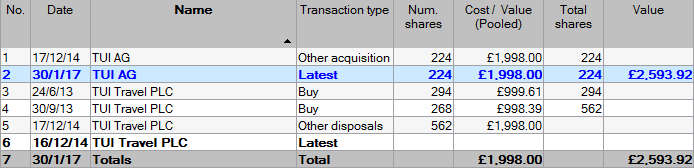
In this example TUI Travel PLC was the only company previously listed on the London Stock Exchange, so was also the only company listed in ShareScope. As a result of the merger, as detailed above, a new share, TUI AG, was listed on the LSE on 17/12/14.
Any transactions that you had recorded in ShareScope under TUI Travel will not be automatically transferred to TUI AG.
When considering how to transfer your holding of TUI Travel to TUI AG it is important to take into consideration capital gains tax calculations. For CGT purposes it is important the costs of the previous holding(s) are used when recording a holding in TUI AG.
The best figure to use for this purpose would be the Cost/Value Pooled total figure for TUI Travel PLC.
The TUI Travel shares need to be disposed of for nil gains.
So in this example the total cost of the two purchases of TUI travel comes to 1998.
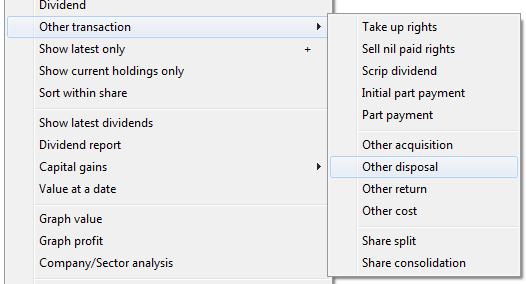
The first thing that you need to do is to dispose of this holding. Right click on one of the transactions, hover the mouse over Other transaction and then select Other disposal.
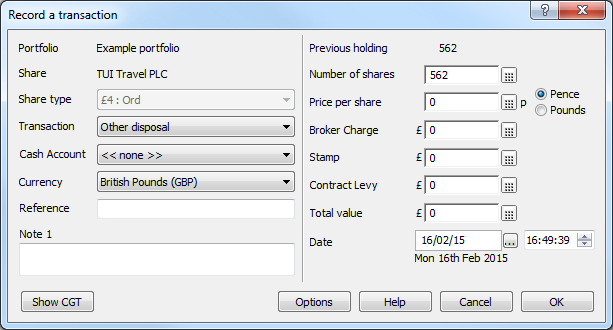
Remember you are disposing of this holding for nil gains so the only fields that need to be completed are the correct number of shares and the date.
When recording the acquisition of the TUI AG shares it's important to note that the number of shares disposed may not be the same as the number of shares acquired.
In this case Tui Travel shareholders received 0.399 new Tui AG shares.
So our 562 shares were converted into 224 new TUI AG shares.
Next you add TUI AG to your portfolio, make sure it is highlighted and then right click on it and select Buy from the menu. It is sensible to change the transaction type from Buy to Other Acquisition so that it is clear there is a difference in the transaction screen.
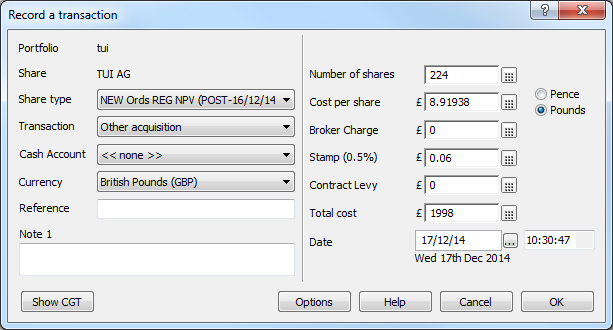
Enter the number of shares and the correct Total cost figure and ShareScope will calculate the Cost per share for you. Make sure to record the acquisition on the correct date.
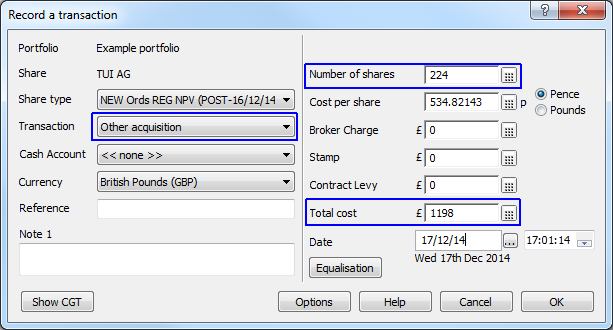
The new transaction should look something like this:

Demerger
Reckitt Benckiser Group PLC - De-merger to form Reckitt Benckiser Group PLC and Indivior PLC January 23 December 2014
Corporate action details:
Reckitt Benckiser Group PLC, the U.K. consumer-goods maker, said it would list its pharmaceutical unit as a separate company on the London Stock Exchange on Dec. 23.
Existing shareholders are to receive one share in the new company--to be named Indivior PLC--for each share they currently hold,
How this affects your holding:
You still hold the same number of shares in Reckitt Benckiser, however you need to add Indivior PLC to your portfolio and record a new transaction against Indivior PLC to correctly represent your new holding in these shares.
Most often, in these instances, you also need to associate some of your original purchase costs with the new holding as well.
The ratio of the cost split is provided by the company in a circular to share holders.
In the Reckitt case the circular stated the following
"The aggregate base cost for CGT purposes of the RB Ordinary Shares and Indivior Ordinary Shares immediately after the Demerger should be the same as the base cost of the RB Ordinary Share before the Demerger. Such base cost should be apportioned between the RB Ordinary Shares and the Indivior Ordinary Share by reference to their respective market values on the first day on which the market values or prices are quoted or published for such shares"
The accepted practice is to take the closing prices for the two stocks on the first day of trading for the new share.
In this case the close for INDV on 23 December was 150 and the close for RB on the same date was 5,200
You can use the following formulae to calculate the new cost values:
Base cost of INDV = Old base cost of RB * 150 / (150 + 5,200)
New base cost of RB. = Old base cost of RB * 5,200 / (150 + 5,200)
Your original transactions in Reckitt Benckiser may have looked like this:

Using the calculations above:
Base cost of INDV = 2936.70 * 150 / (150+5200) = 82.34
New base cost of RB. = 2936.70 * 5200 / (150 + 5200) = 2854.36
You can add the two results together to double check you have calculated the values correctly.
For RB, there are two Buy transactions and the adjustment of the new base cost has to be split correctly between them.
£1980.35 is 67.4% of the old total cost. 67.4% of the new base cost is 1923.84
£956.35 is 32.6% of the old total cost. 32.6% of the new base cost is 930.52
Taking this into account, editing the original transactions in RB. and adding INDV to the portfolio you will end up with something like this:

You can see in this example that, as expected, the same Total cost figure shows both before and after the demerger. Also note that I change the transaction type on INDV from Buy to Other acquisition and also made notes on each of the transactions so that, for future reference, it is clear what has happened.
With regard to any corporate actions that affect your shareholdings, please ensure you read any circulars thoroughly as there can be CGT and/or income tax due on any new issue or return of capital. We would recommend you contact a tax professional for advice in these circumstances as our Support team may only be able to offer limited guidance.
Remember, if you have any trouble finding or using any of these features, please don't hesitate to contact our Customer Support team. They will be delighted to help.